
Recently I have upgraded another client to SharePoint SE version, from SharePoint 2013.
The initial upgrade we did was with the SP SE 2025 September CU and all upgrade went through smoothly.
After the testing phase and before production, we installed November 2025 CU for SharePoint SE. Once we started to mount Content databases to SharePoint Servers, errors began to appear.
The type initializer for ‘Microsoft.SharePoint.OnPrem.Flighting.ECSSPFlightDataProvider’ threw an exception.
Upgrade error log was full of errors
Timestamp Process TID Area Category EventID Level Message Correlation
12/18/2025 17:25:35.07 powershell (0x3E68) 0x1DD4 SharePoint Foundation Upgrade SPFeatureDefinition aj2bj INFO SPWeb Url=https://portal 4c47e4a1-0320-6034-b7db-4f45e0e22ccc
12/18/2025 17:25:35.07 powershell (0x3E68) 0x1DD4 SharePoint Foundation Upgrade SPFeatureDefinition aj2bj ERROR Feature upgrade action ‘CustomUpgradeAction.LocalizeVisibleMicroFeedFieldDisplayNames’ threw an exception upgrading Feature ‘MySiteMicroBlog’ (Id: 15/’ea23650b-0340-4708-b465-441a41c37af7′) in Web ‘https://portal’: The type initializer for ‘Microsoft.SharePoint.OnPrem.Flighting.ECSSPFlightDataProvider’ threw an exception. 4c47e4a1-0320-6034-b7db-4f45e0e22ccc
12/18/2025 17:25:35.07 powershell (0x3E68) 0x1DD4 SharePoint Foundation Upgrade SPWebWssSequence2 ajy85 INFO SPWeb Url=https://portal 4c47e4a1-0320-6034-b7db-4f45e0e22ccc
12/18/2025 17:25:35.07 powershell (0x3E68) 0x1DD4 SharePoint Foundation Upgrade SPWebWssSequence2 ajy85 ERROR Feature upgrade incomplete for Feature ‘MySiteMicroBlog’ (Id: 15/’ea23650b-0340-4708-b465-441a41c37af7′) in Web ‘https://portal’. Exception: The type initializer for ‘Microsoft.SharePoint.OnPrem.Flighting.ECSSPFlightDataProvider’ threw an exception. (Inner Exception: External component has thrown an exception.) 4c47e4a1-0320-6034-b7db-4f45e0e22ccc
12/18/2025 17:25:35.37 powershell (0x3E68) 0x1DD4 SharePoint Foundation Upgrade SPManager ar143 INFO No context object 4c47e4a1-0320-6034-b7db-4f45e0e22ccc
12/18/2025 17:25:35.37 powershell (0x3E68) 0x1DD4 SharePoint Foundation Upgrade SPManager ar143 ERROR Upgrade retry count [0]. 4c47e4a1-0320-6034-b7db-4f45e0e22ccc
12/18/2025 17:25:35.37 powershell (0x3E68) 0x1DD4 SharePoint Foundation Upgrade SPManager ar144 INFO No context object 4c47e4a1-0320-6034-b7db-4f45e0e22ccc
12/18/2025 17:25:35.37 powershell (0x3E68) 0x1DD4 SharePoint Foundation Upgrade SPManager ar144 ERROR Upgrade Requested by [SHAREPOINT\system]. 4c47e4a1-0320-6034-b7db-4f45e0e22ccc
After researching and trying to figure out, what could be the issue, I came accros article on Stefan’s blog https://blog.stefan-gossner.com/2025/09/11/trending-issue-sharepoint-fixes-fail-to-install-after-installation-of-september-2025-cu/
Although it does not specifically mention the issue with mounting a database and receiving errors, but it made enough sense to check it out. Sure enough the “System account” was member of WSS_WPG group
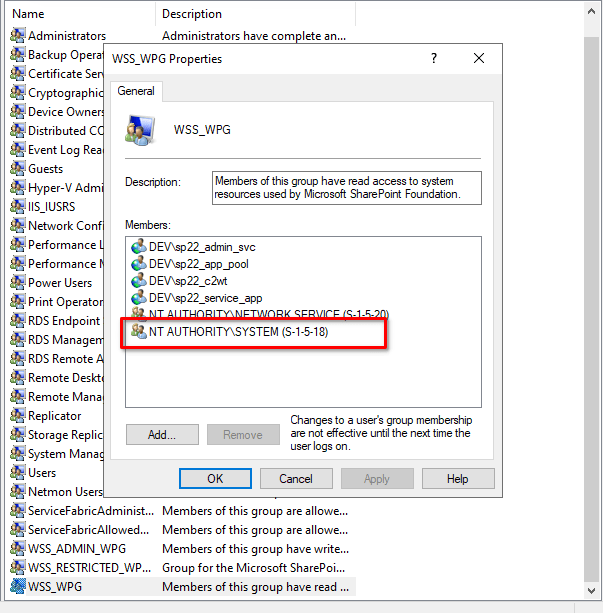
After removing the account from WSS_WPG group, I ran command
Upgrade-SPContentDatabase -Name databaseToUpgrade -WebApplication http://portalSure enough, database upgrade went smoothly after that.
Hopefully, this helps someone when upgrading database from earlier versions of SharePoint.
 Rob3r70 SharePoint Blog
Leave a comment