In a fast-paced business environment where information is the key to success, effective document and content management in SharePoint is becoming increasingly important. Imagine a tool that automatically organizes your files, fixes errors, and makes them more accessible—all powered by artificial intelligence (AI). That’s exactly what the new SharePoint Knowledge Agent feature, which is currently available in preview, brings.
Knowledge Agent isn’t just another feature; is your personal AI agent in SharePoint, acting as an intelligent assistant. It was developed for the Microsoft 365 environment and is optimized to work with Copilot – an AI tool that is already revolutionizing the way we search and create content. In the preview, available from September 2025, you can start using it immediately if you have the appropriate license.
What does SharePoint Knowledge Agent do?
Knowledge Agent is a built-in AI capability in SharePoint that helps organizations prepare content for use in AI environments. Its main purpose is to enrich, organize, and maintain your SharePoint content in a structured, reliable form that’s optimized for Microsoft 365 Copilot agents. Think of it as a virtual librarian who not only sorts books, but also summarizes them, corrects the index, and suggests new connections.
Key features include:
- Automatic content enrichment: The agent analyzes your documents, pages, and files and automatically adds relevant metadata such as keywords, categories, or summaries. This means that your projects or reports become easier to find – without manual editing.
- Metadata Optimization: It helps in tagging files with appropriate tags, which improves search and filtering. For example, if you have a library with thousands of sales documents, the Agent will suggest labels like “Q4 2025” or “Europe,” which makes it easier to analyze.
- Intelligent page summarization: Create short, clear summaries of long-form pages or documents that are useful for quick reference. This is ideal for meetings where you need to quickly review key points.
For business users, this means less time searching for information and more time making decisions. The agent not only cleans up the “untidy” parts of your SharePoint, but also prevents errors such as broken links or outdated pages. And integration with Copilot ensures that your answers in AI conversations are accurate and relevant – without the risk of incorrect data. In practice, Agent reduces the time spent organizing content by up to 30%. This is especially useful in teams where documents accumulate quickly, such as in marketing or HR departments.
How to set up Knowledge Agent in preview?
Setting up the Knowledge Agent in preview is simple, but requires administrator privileges. If you’re an administrator (or have access to an IT team), follow these steps. The process is based on PowerShell commands using the “SharePoint Online PowerShell Module”
Prerequisites
Before you begin, check:
- You have a Microsoft 365 Copilot license (required for all users).
- Install SharePoint Online Management Shell (version 16.0.26615.12013 or later). You can download it for free from the Microsoft Download Center or by using the Install-Module -Name Microsoft.Online.SharePoint.PowerShell command.
- You have administrator access to SharePoint Online (as a global administrator or SharePoint administrator).
Steps to set up
- Connect to the SharePoint admin center: Open PowerShell and enter the command:
Connect-SPOService https://vaš-tenant-admin.sharepoint.com
- Enable the Knowledge Agent: Use the Set-SPOTenant command with the parameters for the scope, as shown in the following examples:
- For all pages: Set-SPOTenant -KnowledgeAgentScope AllSites – Enable on all SharePoint pages in the organization.
- For specific pages: First, set the scope: Set-SPOTenant -KnowledgeAgentScope IncludeSelectedSites.
- Next, add a list of pages: Set-SPOTenant -KnowledgeAgentSelectedSitesList @(“https://vaš-tenant.sharepoint.com/sites/prodaja”, “https://vaš-tenant.sharepoint.com/sites/hr”).
- The list is limited to 100 pages.
- Disable: Set-SPOTenant -KnowledgeAgentScope NoSites.
- Check the setting: Enter Get-SPOTenant | Select-Object KnowledgeAgentScope, where you can check the currently included settings.
If you’re having problems with a version of a PowerShell module, first update by using the command Update-module -Name Microsoft.Online.SharePoint.PowerShell
What does the Knowledge Agent enable?
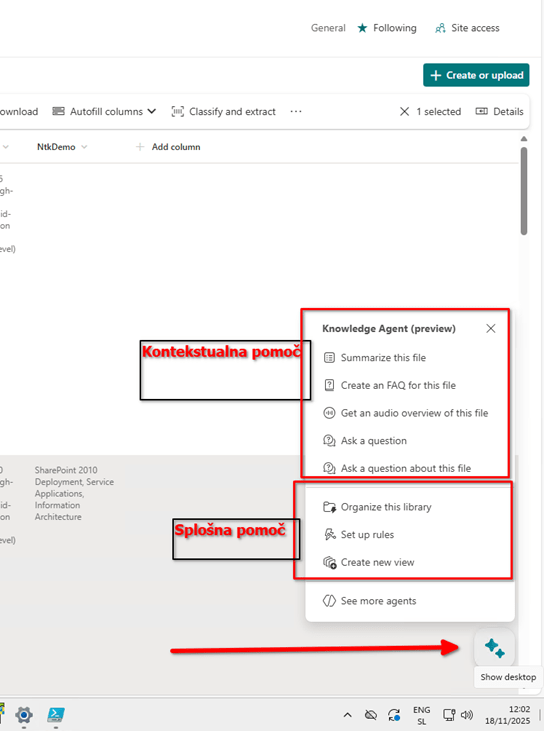
Knowledge Agent is not just a tool for administrators, it is a tool that you can use every day to simplify your work.
- Quick search and summaries: When you open a page or document, click the Agent button in the corner. Ask him: “Summarize the key points of this report” or “Find related files on the topic of ‘sales 2025′”. Responses are immediate and tailored to your content.
- Library organization: The agent automatically detects broken links or stale files and marks them for review. This saves you hours of manual verification – ideal for teams that share large volumes of documents.
- Collaborate with Copilot: When you use Copilot in Teams or Outlook, the agent will ensure that the suggestions are based on your optimized content. For example, when preparing a presentation, Copilot will suggest relevant slides from your SharePoint library.
Practical tips:
- Start small: Enable the Agent in one place (e.g., your project page) and watch it enrich the metadata. After a week, you’ll see an improved search experience.
- As a page owner, invite colleagues and show them how to use the Quick Summaries Agent button – this will boost team efficiency.
- Track changes: The agent keeps track of changes, so check your summaries regularly to stay on top of what’s new in your content.
A step towards a smarter SharePoint
The SharePoint Knowledge Agent in preview represents an important step towards AI content management. By enriching your documents, fixing errors, and quick summaries, it allows you to focus on what really matters: leveraging SharePoint functionality without knowing SharePoint to the core. For additional questions or personalized advice, please contact Kompas Xnet.
In the next Dot, we can take a closer look at the functionalities of the Knowledge Agent, namely:
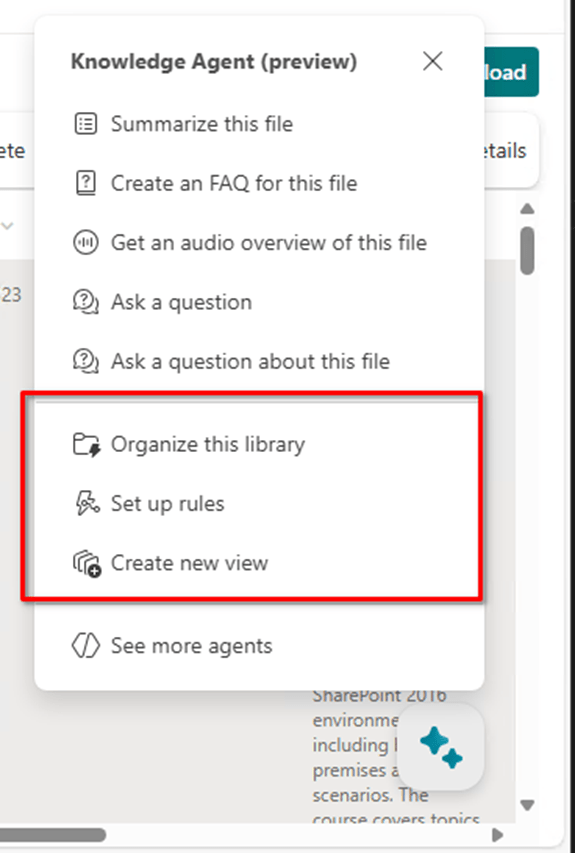
- How to proceed with the rules
- And how to create new views with the help of an agent.
 Rob3r70 SharePoint Blog
Leave a comment