Introduction
In an age where artificial intelligence (AI) is becoming an indispensable part of business processes, Microsoft is introducing innovations that make it easier to manage digital content. SharePoint Knowledge Agent, introduced in public preview in September 2025, is an AI assistant integrated directly into SharePoint that helps enrich, organize, and maintain content. It’s designed to prepare data for Microsoft 365 Copilot and other agents, providing more reliable responses and better productivity. As part of the SharePoint ecosystem, the agent automatically structures metadata, corrects errors, and suggests improvements, which is critical for organizations with large volumes of documents. In this article, we focus on three key functionalities: organizing the document library, setting rules, and creating new views that the agent allows technical users to work more efficiently.
Organize your document library with AI-assisted
One of the strongest advantages of Knowledge Agent is its ability to automatically organize document libraries. In traditional SharePoint environments, managing large collections of documents is often time-consuming, requiring manual metadata addition, categorization, and filtering. The agent simplifies this by using AI to analyze content and automatically generate columns with metadata such as categories, expiration dates, or keywords extracted directly from documents.
The process starts with accessing the agent in the lower-right corner of the SharePoint interface (requires a Microsoft 365 Copilot license and enabling preview by an administrator). The user can enter a natural language command, for example: “Organize this library by contract type and expiration date.” The agent then reviews the documents, extracts relevant information—such as invoice numbers, dates, or customer names—and enters it into new columns. This is especially useful for libraries with hundreds or thousands of documents, where manual processing is not feasible.
For example, in an invoice library, an agent can create columns for “Account Number”, “Amount”, and “Due Date”, using AI to read PDF or Word files. Previewing changes allows you to review and edit before committing to reduce the risk of errors. According to Microsoft’s documentation, this functionality improves search and filtering by up to 50% by making content “Copilot-ready”. For technical users, it is important to know that the agent supports integration with existing columns and can automatically populate values using models such as Azure AI without the need for additional scripts.
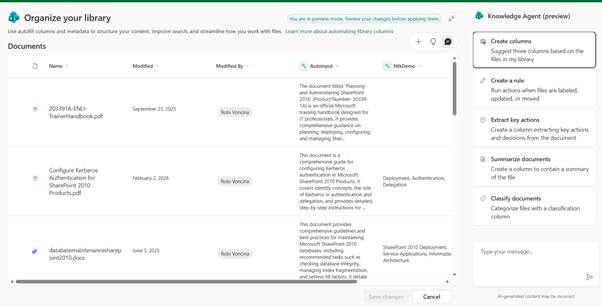
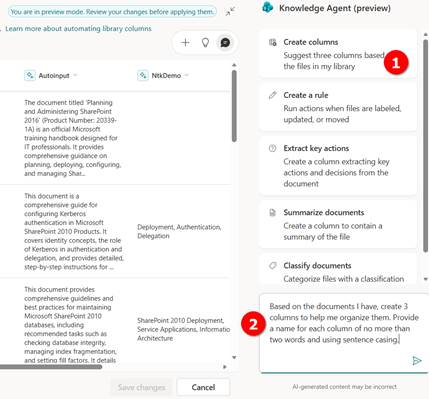
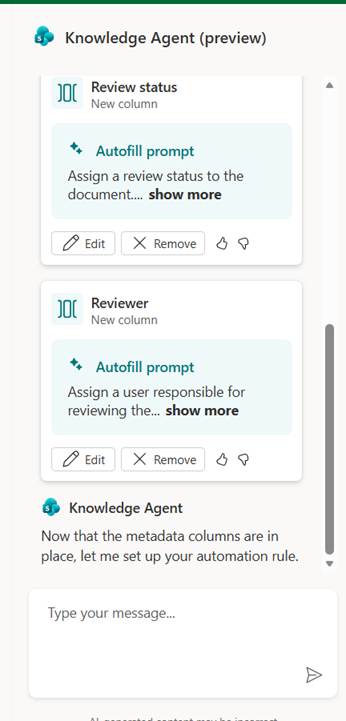
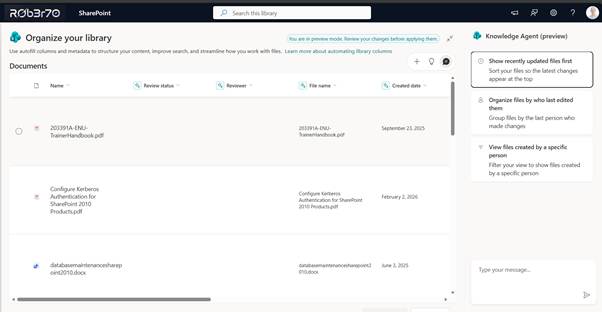
In my case, where I currently have SharePoint documents stored in my document library, the Knowledge agent suggested the following columns:
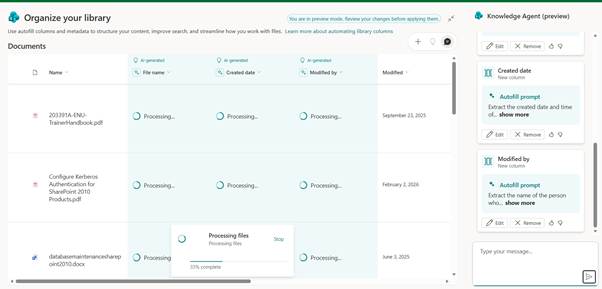
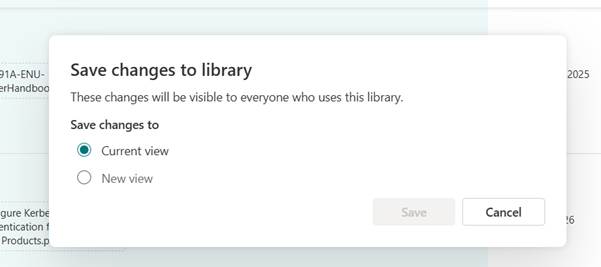
I can then save my changes to the library, and the suggested columns can become part of an existing view or select a new one.
Set up rules to automate processes
Knowledge Agent revolutionizes natural language rule-making, which is ideal for IT professionals who want to automate routine tasks without coding. Compared to classic Power Automate flows, the agent allows you to quickly define rules directly in SharePoint, such as automatic archiving of outdated documents or change notifications.
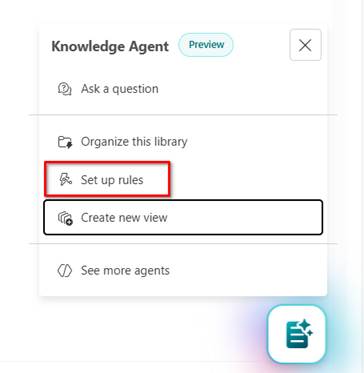
To set up a rule, open the agent interface and enter a command, such as: “Set a rule to move expired documents to the archive folder.” The agent interprets the request, suggests parameters (e.g., date condition, target location), and generates a rule in the background using the Microsoft Graph API. Rules can include metadata-based conditions such as “if the category is ‘Contract’ and the expiration date is less than today, move to ‘Archive’ and send an email to the owner.”
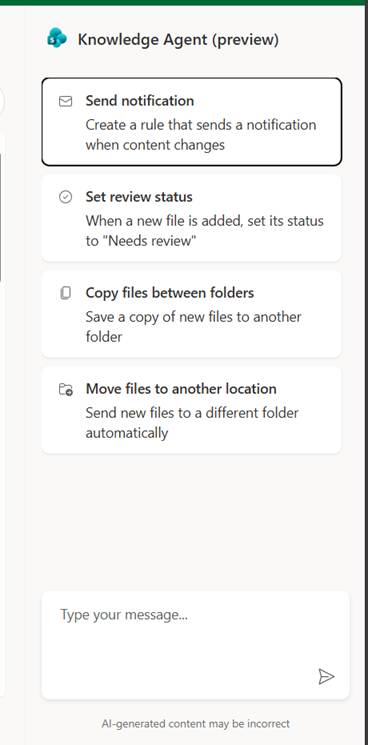
Technically, an agent uses AI models to understand context, which means it supports complex logics such as AND/OR conditions or integrations with other Microsoft 365 services. Administrators can review the rules in the SharePoint settings panel, where they are displayed as JSON objects for advanced editing. This is especially useful in large organizations where rules help maintain compliance, for example, by automatically deleting documents after a certain retention period.
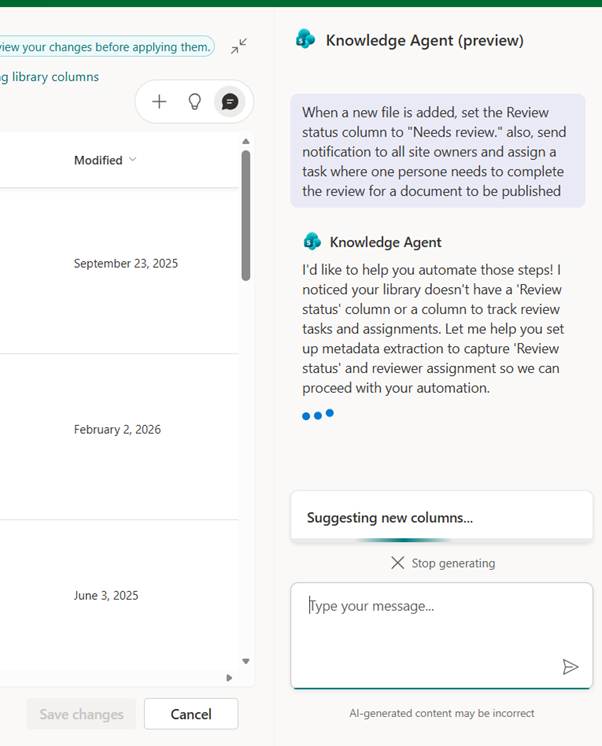
When we want to use the “Set up rules” option, it is also necessary to enter instructions to the AI Agent, where we can combine different types of tasks. In the event that we refer to fields that do not yet exist, AI agnet will suggest creating new fields, and then a pop-up window will appear where we can set up classic SharePoint notification rules.
Create new views with the help of the agent
The Knowledge Agent makes it easy to create customized views, which are crucial for visualizing and filtering data in libraries. Instead of manually configuring filters in the SharePoint interface, users can use AI to generate views based on metadata.
The process is simple: In the agent’s chat, type “Create view for agreements, filtered by expiration date and category.” The agent analyzes existing columns, suggests filters (e.g., “Expiration date > today” and “Category = NDA”), and creates a new view that can be saved as default or shared.
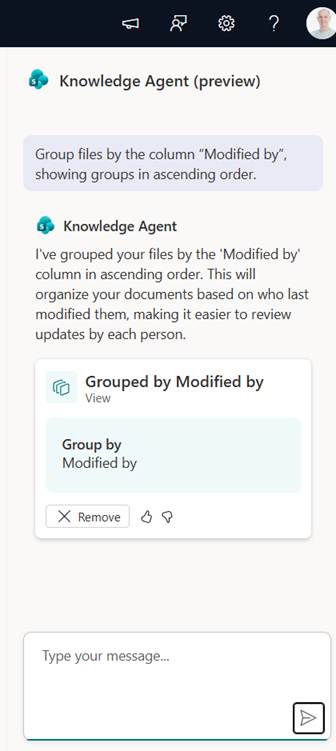
For a technical audience, it is important that the agent supports CAML (Collaborative Application Markup Language) behind the scenes, which allows views to be exported to XML for scripting. In addition, the agent can optimize views for performance by suggesting indexes on columns.
Conclusion: The Future of Knowledge Management
SharePoint Knowledge Agent represents a step forward in the integration of AI into the daily work of IT professionals. By organizing libraries, setting up rules, and creating views, the agent not only streamlines processes but also ensures that content is ready for future AI applications. Although it is still in the preview phase, its potential to increase efficiency is enormous.
 Rob3r70 SharePoint Blog
Leave a comment