
Introduction
https://github.com/Rob3r70/SharePoint/blob/main/Get-SPSELegacyUsage.ps1
In July of 2027, Microsoft will remove all workflow 2010 and InfoPath functionalities from SharePoint Subscription Edition. The end of life was already here for mentioned technologies, but Microsoft decided that they will introduce an option to re-enable the workflow 2010 and InfoPath technology, as organizations were still not prepared for removal. Now, they have decided, that July 2027 is the final date that this will be removed.
If you need a quick, read-only inventory of legacy process dependencies in SharePoint Subscription Edition, Get-SPSELegacyUsage.ps1 gives you a practical starting point.
It scans site collections, webs, and lists/libraries to identify where SharePoint 2010 workflow associations and InfoPath-related form configuration still exist.
The script is designed for migration and modernization planning: it does not modify content, and it avoids unsupported APIs (PnP/CSOM/REST/SQL), relying on SSOM from a SharePoint server context.
What the Script Checks
- Legacy workflows: List-level and list content-type workflow associations using the 2010 SSOM model.
- InfoPath indicators:
_ipfs_infopathenabledon content types, InfoPath-like form URLs, and.xsntemplate references. - Scan completeness: Marks findings as
True,False, orUnknown, plusComplete/Partialcheck status. - Operational issues: Writes scan errors to a separate error CSV so missing findings are not mistaken for “clean.”
Output Files
- Main report: One CSV row per list/library with workflow and InfoPath evidence.
- Error report: A sibling file named
<ReportName>-Errors.csvwith any scan/access exceptions.
Usage
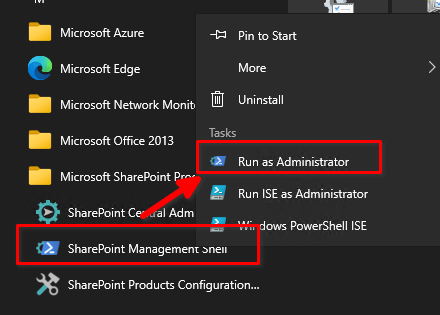
For usage, I would recommend using “SharePoint Management Shell” and you must run it as an administrator.
Site collection report
If you script is located in “c:\scripts” folder, than you can run it as follows:
. "C:\scripts\Get-SPSELegacyUsage.ps1" ` -SiteCollectionUrl "https://sp/sites/finance" ` -ReportPath "C:\Reports\LegacyUsage.csv" ` -MatchesOnly ` -Delimiter ';'
Web application report
. "C:\scripts\Get-SPSELegacyUsage.ps1" ` -WebApplicationUrl "https://sp" ` -ReportPath "C:\Reports\LegacyUsage.csv"
The script is available on GitHub at https://github.com/Rob3r70/SharePoint/blob/main/Get-SPSELegacyUsage.ps1.


Leave a Reply